> ## Documentation Index
> Fetch the complete documentation index at: https://docs.kinse.io/llms.txt
> Use this file to discover all available pages before exploring further.
# How Try a check-in with Cora works
> Try a check-in with Cora in the app after sign-in, with no credit card, before or after you choose a plan.
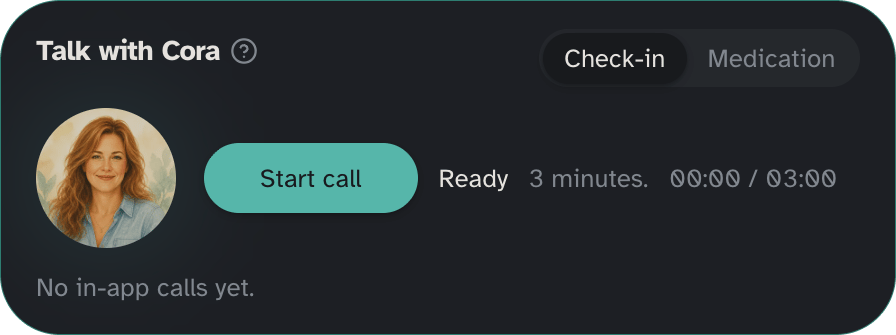
**Try a check-in with Cora** is an in-app check-in on this device. The heading is **Try a check-in with Cora**. Trust line: **No credit card to try a check-in with Cora.**
**You can try a check-in before you choose a plan.** Outbound phone check-ins still need a paid plan in **Settings → Billing**, where you may see **Choose a plan to start phone check-ins** until you pick **Essentials**, **Everyday**, or **Family**.
## Where to open it
* **Calls → Voice**
* **Calls → Check-ins** or **Calls → Medications**, where you may see **Have Cora call** or **Have Cora call** followed by their first name
 For how Cora sounds and what to talk about on phone check-ins, see [Voice](/features/voice). For scheduled outbound phone check-ins, see [Phone check-ins](/features/voice-checkins).
## Length
The in-app try is a **check-in** only (about **3 minutes**). It is not a medication reminder dial and not an outbound phone call to your loved one.
## Daily limit
You can try a check-in with Cora up to **5** times per day. The app shows how many you have left, for example **3 of 5 left today.** When you are out, you see **None left today.** or **You used all 5 check-ins today. Try again tomorrow.**
## Start a check-in
1. Open **Try a check-in with Cora** from **Calls → Voice**, Check-ins, or Medications.
2. Allow the microphone if asked (only for the allow-mic step).
3. Choose **Start check-in**.
4. Choose **End check-in** when you are done.
While the session runs, status can show **Checking microphone.**, **Connecting.**, **Cora is speaking.**, **Listening.**, **Thinking.**, **Wrapping up soon.**, or **Ready**.
When you finish, the recap is **You finished a check-in with Cora.**
## After the try
Try a check-in with Cora does not replace outbound phone check-ins. When you want Cora to call them on the phone on a schedule:
1. Set a time under **Calls → Check-ins**.
2. Choose a plan in **Settings → Billing** if you have not already.
This documentation is built and hosted on [Mintlify](https://mintlify.com), a developer documentation platform.
For how Cora sounds and what to talk about on phone check-ins, see [Voice](/features/voice). For scheduled outbound phone check-ins, see [Phone check-ins](/features/voice-checkins).
## Length
The in-app try is a **check-in** only (about **3 minutes**). It is not a medication reminder dial and not an outbound phone call to your loved one.
## Daily limit
You can try a check-in with Cora up to **5** times per day. The app shows how many you have left, for example **3 of 5 left today.** When you are out, you see **None left today.** or **You used all 5 check-ins today. Try again tomorrow.**
## Start a check-in
1. Open **Try a check-in with Cora** from **Calls → Voice**, Check-ins, or Medications.
2. Allow the microphone if asked (only for the allow-mic step).
3. Choose **Start check-in**.
4. Choose **End check-in** when you are done.
While the session runs, status can show **Checking microphone.**, **Connecting.**, **Cora is speaking.**, **Listening.**, **Thinking.**, **Wrapping up soon.**, or **Ready**.
When you finish, the recap is **You finished a check-in with Cora.**
## After the try
Try a check-in with Cora does not replace outbound phone check-ins. When you want Cora to call them on the phone on a schedule:
1. Set a time under **Calls → Check-ins**.
2. Choose a plan in **Settings → Billing** if you have not already.
This documentation is built and hosted on [Mintlify](https://mintlify.com), a developer documentation platform.